使用IndexedDB优化资源加载速度
IndexedDB 是什么?
IndexedDB 是一个基于键值对的数据库,可以用来存储大量结构化数据。它可以用来缓存资 源,以便在离线时使用 。mdn 介绍
为什么使用 IndexedDB
对比 localStorage,sessionStorage,cookie 等存储方式 IndexedDB 有以下优势:
- IndexedDB 是异步的,不会阻塞主线程
- IndexedDB 可以存储大量数据,而且可以存 储结构化克隆算法支 持的任何对象
- IndexedDB 可以用来缓存资源,以便在离线时使用
- IndexedDB 可以用来存储用户的状态,以便在下次打开页面时恢复
| localStorage | sessionStorage | cookie | IndexedDB | |
|---|---|---|---|---|
| 有效期 | 永久有效 | 关闭浏览器清除 | 非持久化,刷新页面则刷新 | 永久有效 |
| 存储容量 | 一般 5MB | 一般 5MB | 一般 4KB | 无上限 |
| 存储类型限制 | 可 JSON 序列化的值 | 可 JSON 序列化的值 | 可 JSON 序列化的值 | 存储结构化克隆算法支持的任何对象 |
| 存取数据任务类型 | 同步 | 同步 | 同步 | 异步,同步 |
| 同域限制 | 是 | 是 | 是 | 是 |
兼容性
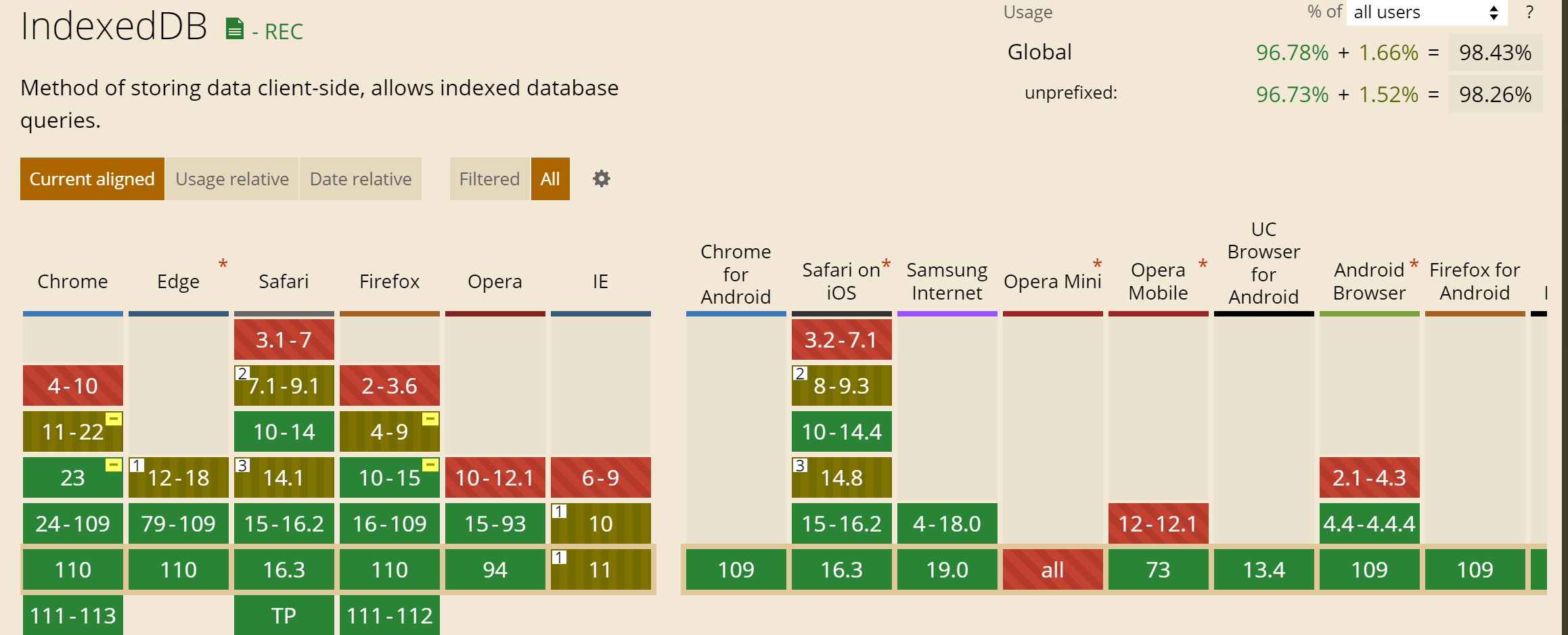
IndexedDB 基本概念
数据库
数据库是一个逻辑容器,用于存储数据。一个数据库可以包含多个对象存储空间(object store)。每个数据库都有一个名称,用于唯一标识它。
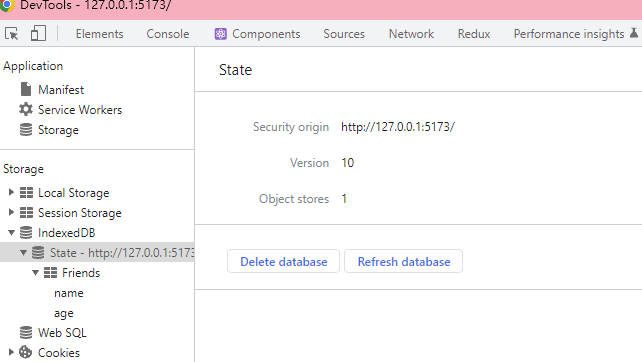
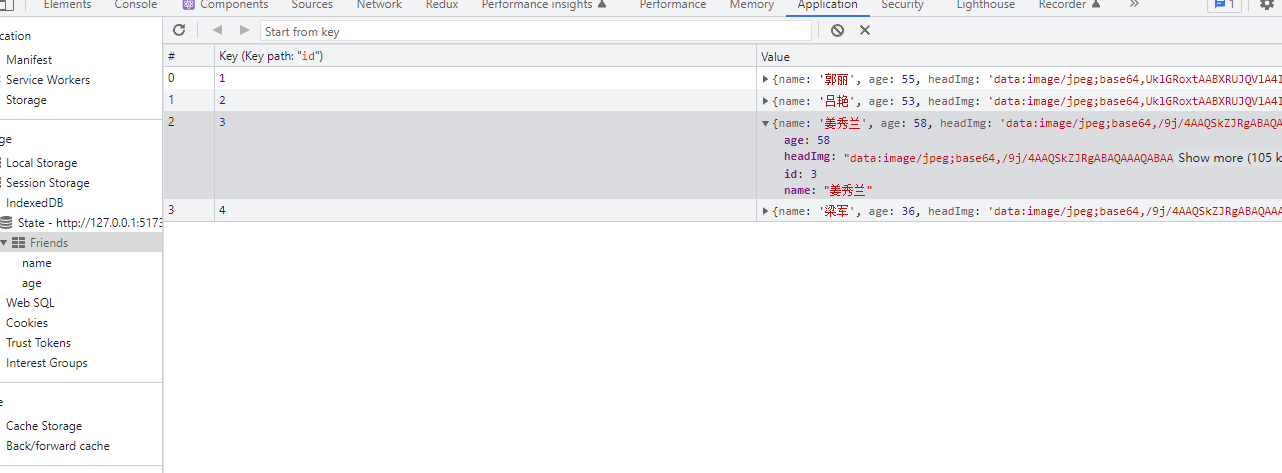
打开 f12 可以在 Application 中看到 IndexedDB 中的数据库, 也可以在浏览器的控制台
中输入indexedDB查看
- State 为数据库名称
- Security origin 为域名
- Version 为版本号(每次修改表结构需更改版本号)
- Object store 为表名
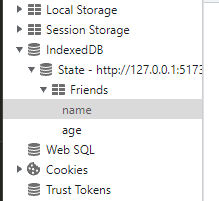
对象存储空间(object store)
对象存储空间是一个逻辑容器,用于存储对象。对象存储空间中的对象都有一个键,用于唯 一标识它们。对象存储空间中的对象都有一个键,用于唯一标识它们。
索引
事务
事务是一组操作的集合,这些操作要么全部成功,要么全部失败。
IndexedDb 框架
mdn 备注:IndexedDB API 是强大的,但对于简单的情况可能看起来太复杂。如果你更喜欢 一个简单的 API,请尝试 localForage、dexie.js、PouchDB、idb、idb-keyval、JsStore 或者 lovefield 之类的库,这些库使 IndexedDB 对开发者来说更加友好。 这里我们采用 dexie.js 进行开发
dexie.js
dexie.js是一个轻量级的 IndexedDB 封装库,它提供了一个简单的 API 来操作 IndexedDB。dexie.js 的 API 设计 参考了 jQuery 的 API 设计,因此非常容易上手。
安装
yarn
yarn add dexienpm
npm install dexie创建数据库模型
在 src/models 目录下创建 State.ts 文件
import Dexie, { Table } from 'dexie'

export interface Friend {
	id?: number
	name: string
	age: number
	headImg: string
}

export class State extends Dexie {
	// friends 表类型声明
	Friends!: Table<Friend>
	constructor() {
		super('State')
		// 若表结构改变需更改版本号
		this.version(1).stores({
			// 主键 id 自增, name,age作为索引 不要将文件,大字符串存储在索引中.如Friend.headImg
			Friends: '++id, name, age',
		})
	}
}

export const { Friends } = new State()
创建控制器
在 src/controllers 目录下创建 State.ts 文件
import { Friend, Friends } from '../models/State'

/**
 * @description 查询
 */
export async function getFriend(id: string) {
	const friend = await Friends.get(id)
	return friend
}

/**
 * @description 查询年龄为age的所有朋友
 */
export async function getFriendsByAge(age: number) {
	const friends = await Friends.where('age').equals(age).toArray()
	return friends
}

/**
 * @description 获取所有朋友
 */
export async function getAllFriends() {
	const friends = await Friends.toArray()
	return friends
}

/**
 * @description 添加朋友
 */
export async function addFriend(data: Friend) {
	const id = await Friends.add(data)
	return id
}

/**
 * @description 更新朋友
 */
export async function updateFriend(data: Friend) {
	const id = await Friends.put(data)
	return id
}

/**
 * @description 删除朋友
 */
export async function deleteFriend(id: string) {
	return await Friends.delete(id)
}
使用
react
import React, { useEffect, useState } from 'react'
import mock from 'mockjs'
import './App.css'
import { Button, Table, TableProps } from 'antd'
import { Friend } from './models/State'
import { addFriend, getAllFriends } from './controllers/State'
import img1 from './img/缓存/1.jpg'
import img2 from './img/缓存/2.jpg'

const App: React.FC<AppProps> = () => {
	const [dataSource, setDataSource] = useState<Friend[]>([])
	const columns = [
		{
			title: 'id',
			dataIndex: 'id',
		},
		{
			title: '姓名',
			dataIndex: 'name',
		},
		{
			title: '年龄',
			dataIndex: 'age',
		},
		{
			title: '头像',
			dataIndex: 'headImg',
			render: (text: string) => (
				<img width={50} height={50} src={text} alt="" />
			),
		},
	]
	useEffect(() => {
		request()
	}, [])
	async function request() {
		const res = await getAllFriends()
		setDataSource(res)
	}
	const tableConfig: TableProps<Friend> = {
		columns,
		dataSource,
		rowKey: 'id',
	}
	return (
		<div>
			<Table {...tableConfig}></Table>
			<Button
				onClick={async () => {
					const headImg = await imgToBase64(Math.random() > 0.5 ? img1 : img2)
					const data = mock.mock({
						name: '@cname',
						age: '@integer(18, 60)',
						headImg,
					})
					await addFriend(data)
					await request()
				}}
			>
				添加随机朋友
			</Button>
		</div>
	)
}

interface AppProps {}
export default App
App.displayName = 'App'

async function imgToBase64(url: string) {
	const res = await fetch(url, {})
	const blob = await res.blob()
	return await blobToBase64(blob)
}
function blobToBase64(blob: Blob): Promise<string> {
	const reader = new FileReader()
	reader.readAsDataURL(blob)
	return new Promise((resolve) => {
		reader.onloadend = () => {
			resolve(reader.result as string)
		}
	})
}
vue
<script setup lang="ts">
import { addFriend, getAllFriends } from './controllers/State'
import mock from 'mockjs'
import img1 from './img/缓存/1.jpg'
import img2 from './img/缓存/2.jpg'
import { Friend } from './models/State'
import { Button, Table, TableProps } from 'ant-design-vue'
import { h, reactive } from 'vue'
import 'ant-design-vue/dist/antd.css'
const dataSource = reactive<Friend[]>([])
const columns = [
	{
		title: 'id',
		dataIndex: 'id',
	},
	{
		title: '姓名',
		dataIndex: 'name',
	},
	{
		title: '年龄',
		dataIndex: 'age',
	},
	{
		title: '头像',
		dataIndex: 'headImg',
		customRender: ({ text, index }: { text: string; index: number }) => {
			return h('img', { src: text, width: 50, height: 50 })
		},
	},
]

request()
async function add() {
	const headImg = await imgToBase64(Math.random() > 0.5 ? img1 : img2)
	const data = mock.mock({
		name: '@cname',
		age: '@integer(18, 60)',
		headImg,
	})
	await addFriend(data)
	await request()
}
async function request() {
	const res = await getAllFriends()
	dataSource.splice(0, dataSource.length, ...res)
	return res
}

async function imgToBase64(url: string) {
	const res = await fetch(url, {})
	const blob = await res.blob()
	return await blobToBase64(blob)
}
function blobToBase64(blob: Blob): Promise<string> {
	const reader = new FileReader()
	reader.readAsDataURL(blob)
	return new Promise((resolve) => {
		reader.onloadend = () => {
			resolve(reader.result as string)
		}
	})
}
</script>

<template>
	<div>
		<Table :data-source="dataSource" :row-key="'id'" :columns="columns" />
		<Button @click="add">添加好友</Button>
	</div>
</template>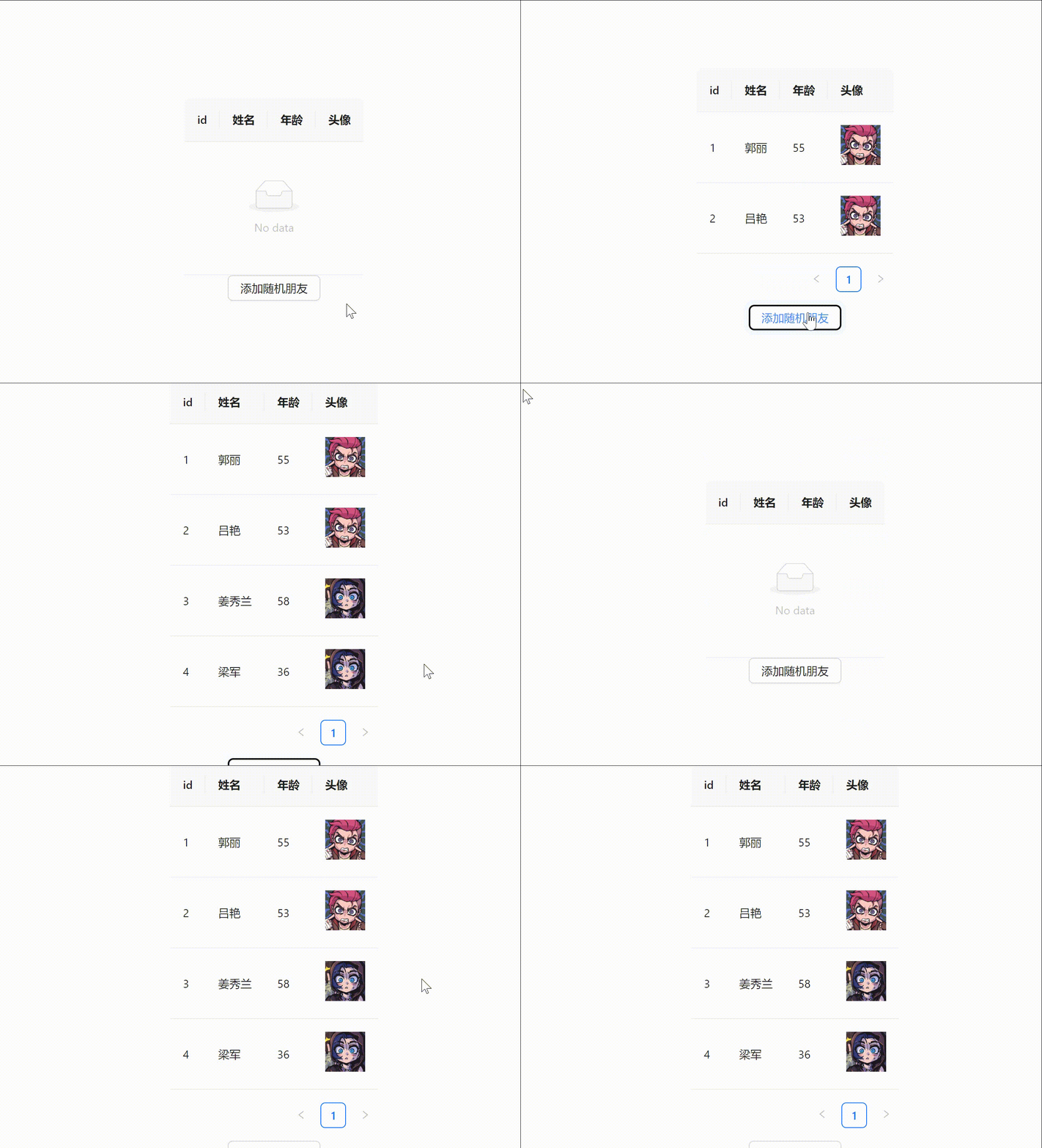
缓存工具
使用我们已经基本了解,那么我们就可以开始创建缓存工具类了,我们需要实现的功能有:
- 缓存数据
- 获取缓存数据
- 清除缓存数据
- 缓存数据过期清除
数据库模型
/src/models/Cache.ts
// db.ts
import Dexie, { Table } from 'dexie'

/** 资源缓存 */
export type ResourceCacheType = {
	id?: number
	/** 资源路径 */
	url: string
	/** 资源内容 */
	content: Blob
	/** 资源最后修改时间 */
	timestamp: number
	/** 过期时间 */
	expireTime?: number
}

// 若数据结构改变应当修改版本号
class Cache extends Dexie {
	ResourceCache!: Table<ResourceCacheType>
	constructor() {
		super('Cache')
		this.version(1).stores({
			// Primary key and indexed props 索引 不要索引文件
			ResourceCache: '++id, url,timestamp',
		})
	}
}
export const { ResourceCache } = new Cache()
控制器
/src/controllers/ResourceCache.ts
import { ResourceCache } from '../models/Cache'

export async function getCache(url: string) {
	try {
		return await ResourceCache.where('url').equals(url).first()
	} catch (error) {
		console.error(error)
		return
	}
}

export async function setCache(data: {
	url: string
	content: Blob
	expireTime?: number
}) {
	try {
		const cache = await getCache(data.url)
		if (cache?.id) {
			// 更新缓存
			return await ResourceCache.update(cache.id, {
				...data,
				timestamp: Date.now(),
			})
		}
		return await ResourceCache.add({
			...data,
			timestamp: Date.now(),
		})
	} catch (error) {
		console.error(error)
		return
	}
}

// 将所有过期的缓存清除
export async function clearCache() {
	const caches = await ResourceCache.toArray()
	caches.forEach((cache) => {
		if (cache.expireTime) {
			const now = Date.now()
			const timestamp = cache.timestamp
			if (now - timestamp > cache.expireTime) {
				ResourceCache.delete(cache.id!)
			}
		}
	})
}
工具类
/src/util/ResourceCache.ts
import { clearCache, getCache, setCache } from '../controllers/ResourceCache'

/**
 * @description 通用缓存策略
 */
export class ResourceCache {
	private url: string
	/** 过期时间 */
	private expireTime?: number
	/**
	 * @param url 资源路径
	 * @param expireTime 过期时间
	 */
	constructor(url: string, expireTime?: number | string) {
		this.url = url
		let time: number | undefined
		if (typeof expireTime === 'string') {
			const unit = (expireTime as string).slice(-1) as keyof typeof Time
			time = Number(Time[unit]) * Number(expireTime.slice(0, -1))
		} else {
			time = expireTime
		}
		this.expireTime = time
	}
	private async fetch() {
		try {
			const response = await fetch(this.url)
			const blob = await response.blob()
			// 写入缓存
			await setCache({
				url: this.url,
				content: blob,
				expireTime: this.expireTime,
			})
			return blob
		} catch (error) {
			console.error(error)
			return
		}
	}
	async get() {
		try {
			const cache = await getCache(this.url)
			// 未击中缓存
			if (!cache) {
				return await this.fetch()
			}
			// 设置了过期时间
			else if (this.expireTime) {
				// 过期
				if (Date.now() - cache.timestamp > this.expireTime) {
					return await this.fetch()
				}
			}
			// 击中缓存切未过期
			return cache.content
		} catch (error) {
			console.error(error)
			return
		}
	}
	/**
	 * @description 清除缓存
	 */
	static async clear() {
		try {
			await clearCache()
		} catch (error) {
			console.error(error)
			return
		}
	}
}

/**
 * time to  ms
 */
enum Time {
	/** hour */
	h = 60 * 60 * 1000,
	/** day */
	d = 24 * 60 * 60 * 1000,
	/** week */
	w = 7 * 24 * 60 * 60 * 1000,
	/** month */
	m = 30 * 24 * 60 * 60 * 1000,
	/** year */
	y = 365 * 24 * 60 * 60 * 1000,
}
使用
例使用迅雷下载 js-sdk
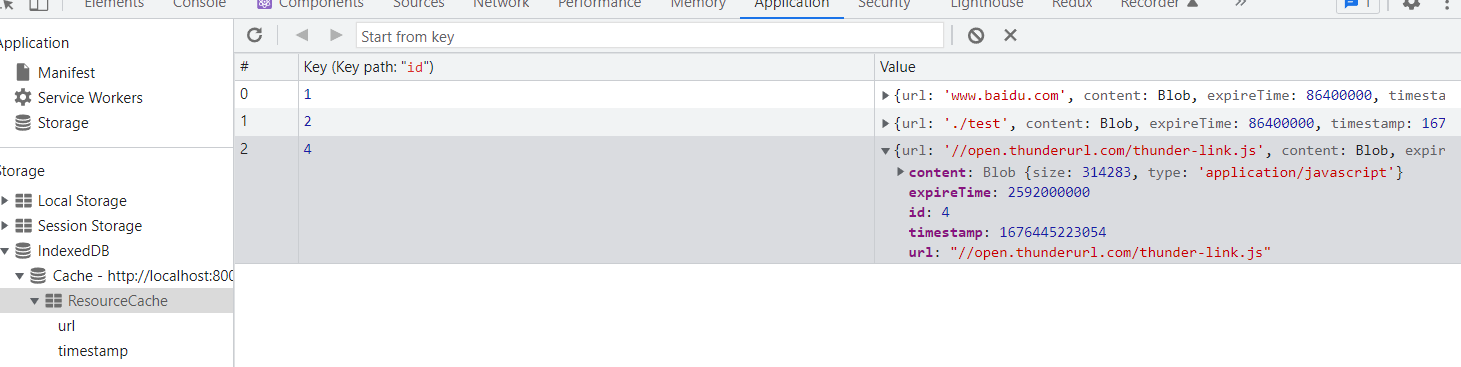
一般的 js-sdk 更新频率很低且向下兼容,我们可以将它缓存再 indexedDB 中,当下次再 次加载时,我们可以直接从缓存中获取,而不需要再次请求远端 js-sdk
/**
 * @description 加载远端js-sdk
 * @param url 远端js脚本地址
 * @param id 创建script标签的id
 */
export async function remoteJsToScript(
	url: string,
	id: string = 'fetch-script',
	expireTime?: string | number
) {
	const script = document.getElementById(id) ?? document.createElement('script')
	script.id = id
	const cache = new ResourceCache(url, expireTime)
	script.innerHTML = (await (await cache.get())?.text()) ?? ''
	document.body.appendChild(script)
}
/**
* @description 调用迅雷下载
*/
export async function thunderDownload(
/** 指定任务组名称,可将批量任务合并成类似BT任务的【任务组】,迅雷将在下载目录中创建同名子文件夹保存所有下载文件。【推荐填写。若不填此项,迅雷下载列表会显示所有本次创建的下载任务,可能会使用户的下载列表显得杂乱】 */
taskGroupName: string,
tasks: {
url: string // 指定下载地址【必填项】
/** 指定文件的下载目录,相对于当前的downloadDir目录【一般不必填写,除非某些文件的下载地址的路径不符合你的需求】 */
dir: string
}[]
) {
await remoteJsToScript(
'//open.thunderurl.com/thunder-link.js',
'thunder',
'1m'
)
const thunderLink = (window as any).thunderLink
thunderLink.newTask({
taskGroupName,
hideInfo: '1', // 是否隐藏下载任务信息
hideYunPan: '1', // 是否隐藏云盘
hideWin: '1', // 是否隐藏下载窗口
downloadDir: taskGroupName.length === 1 ? '' : taskGroupName, // 指定当前任务的下载目录名称,迅雷会在用户剩余空间最大的磁盘根目录中创建这个目录。【若不填此项,会下载到用户默认下载目录】
tasks,
})
}
总结
本文介绍了如何使用 indexedDB 来缓存资源,当下次再次加载时,我们可以直接从缓存中 获取,而不需要再次请求远端资源,从而提升用户体验,减少请求次数,减少服务器压力, 减少带宽消耗。
上次更新于: 2026-03-03 01:53